Cricket
 Tennis
 Football
 Table Tennis
 Casino
 Volleyball
 Baseball
 Basketball
 Horse Racing
 Politics
 Greyhound Racing
 Binary
 Int Casino
 Sports Book
 Ice Hockey
 Darts
 Futsal
 Rugby
Before you may access your account, one of the most crucial procedures is to activate your Lotus365 ID. Being aware of the verification procedure will help you avoid delays and have a more seamless registration experience, whether you are completing Lotus365 Signup for the first time or getting ready for your first Lotus365 Login.
The Lotus365 verification procedure is built to verify user data, enhance account security, and ensure that account information is carefully reviewed before activating. A successful verification procedure enables users to access their account features without unnecessary interruptions and assists in the creation of a safer account environment.
Although most accounts get verified fast, activation times may be different based on several kinds of factors, such as system activity, verification criteria, and the accuracy of provided data. To lower the chance of delays, users should make sure that all registration information is accurate.
This comprehensive guide describes how the verification process operates, how long activation typically takes, typical verification problems, and practical suggestions to finish account activation more quickly.
What Is Lotus365 ID Verification?
A Lotus365 ID is verified to make sure the data entered during registration is accurate and belongs to the person who created the account. The verification is a crucial security method that enhances overall account protection, lowers the probability of fake accounts, and maintains account accuracy.
During the verification process, Lotus365 may review important account information such as:
- Registered mobile number
- Email address (if applicable)
- Username
- Basic account details
- Registration information
Before users may access their accounts, this procedure helps guarantee that account information is accurately saved and validated.
Smoother account management, simpler login access, and improved safety of personal account information are just a few advantages of successfully completing verification.
Because incomplete or inaccurate information can cause delays in verification, users should always enter accurate information when registering. Before completing Lotus365 Signup, review all given information to help prevent typical activation issues.
Your account becomes active and used as soon as the verification process is successfully finished. By ensuring that your account information is accurate and valid, completing verification also helps with future account management.
You can also check: Lotus365 Account Verification
Why Verification Is Important for Lotus365 Login?
A verified account is the first step towards a successful Lotus365 login. Verification significantly reduces the chance of unwanted access while helping in confirming that the account belongs to the registered user. It serves as a crucial security measure that keeps account information accurate and makes using account features safer.
Verification not only increases security but also helps account recovery in situations that users need to change account information or lose their login credentials. Managing the account becomes more dependable and convenient since the registered details have already been verified.
By ensuring that user data is valid and appropriately related to the account, a verified account also has the potential to reduce common login-related issues. Secure account access is strengthened when the verification process is completed during registration.
Some important benefits include:
- Improved account security
- Protection against unauthorized access
- Faster account recovery
- Better identity verification
- Smooth login experience
- Reliable account management
Every time a user attempts to access their account, completing verification makes the Lotus365 Login process safer and more reliable. Additionally, it facilitates improved account security while allowing users to better control the information they provide.
You can also check: Lotus365 Book Online Guide for Beginners | Login & Features
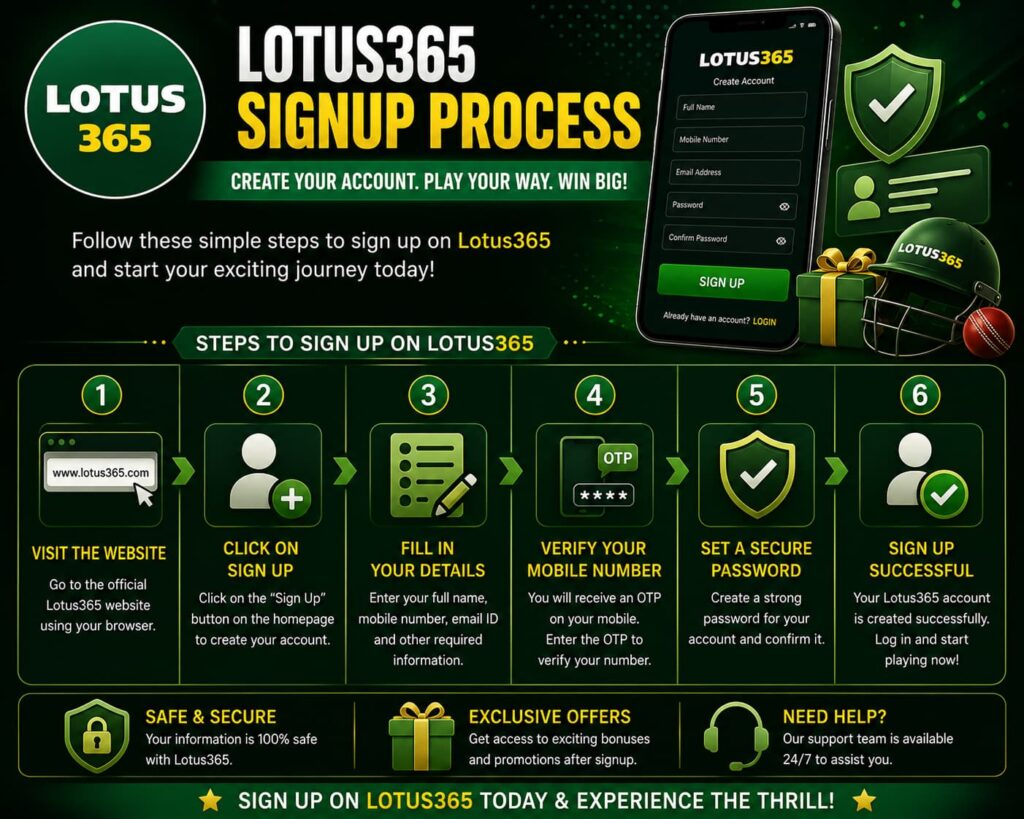
Lotus365 Signup Process
When the users enter accurate registration information, the Lotus365 Signup procedure is easy to complete and often takes a few minutes. One of the most crucial tasks in creating an account is entering accurate information since it facilitates verification and lowers the chance of activation delays.
Check each section of your registration form before submitting it to prevent common errors like spelling mistakes, incomplete account details, or inaccurate contact information. Giving accurate information from the beginning makes the verification process go more smoothly and ensures that your Lotus365 ID gets enabled without unnecessary delays.
Step 1: Enter Personal Details: Users usually provide:
- Full name
- Mobile number
- Preferred username
- Password
Always ensure the information entered is correct.
Step 2: Submit Registration: After entering your information, submit the registration request. Once submitted, the verification process begins automatically.
Step 3: Verify Contact Information: Depending on the registration process, users may be asked to verify their mobile number or email address. Completing this step successfully moves the account to the activation stage.
Properly following these instructions increases the chance of a fast Lotus365 ID activation, avoids delays, and enhances verification accuracy. Additionally, a well-organized signup procedure offers a stronger basis for future safe account management.
You can also check: How to Create a Lotus365 Book Account Step by Step
Lotus365 ID Activation Process
Your Lotus365 ID moves on to the verification process after completing Lotus365 Signup. The given account information is checked during this procedure to make sure that the data are valid and match to the necessary security criteria.
The activation process plays an important role in creating a secure account environment. It makes sure that account details are properly verified before access is given, assists in validating user information, and decreases unauthorized account activity.
Because incomplete or inaccurate information can extend the time needed for verification, users should ensure that the information they entered at registration is accurate. The account proceeds toward activation after the necessary checks are successfully completed.
The process generally includes the following steps.
Registration Review: The system reviews all information submitted during registration.
Information Verification
Your contact information and account details are verified for accuracy.
Security Validation: Additional security checks may be performed depending on the account information provided.
Account Activation: Once verification has been completed successfully, the Lotus365 ID becomes active, allowing users to access their accounts and manage their profile information.
Thoroughly completing each activation step assures that the account setup procedure is finished properly and helps minimize delays. Better security and future account management are also supported by a properly validated Lotus365 ID.
You can also check: Lotus365 Login Guide for Beginners: Access, Security & Tips
How Long Does Lotus365 Activation Take?
A Lotus365 ID activation time might change based on several types of factors, including the verification status, system activity, and the accuracy of the data entered during registration. Accounts are typically enabled soon after the successful completion of the verification process.
When all given information is correct and the verification procedure is finished without any problems, many users receive activation confirmation in a few minutes. However, activation could take a little longer when there is a lot of registration activity or when additional verifications are needed.
Typical activation timelines include:
- Immediate activation after successful verification
- A few minutes during normal registration periods
- Longer processing during busy hours
- Additional review if extra verification is required
After the activation process is finished, users can use their registered account information to Lotus365 Login and start securely managing their account. The greatest approaches to facilitate faster Lotus365 ID activation are to make sure that all registration information is correct and to fully complete all verification procedures.
Factors That Affect Lotus365 Login Verification Time
The quickness that occurs when your Lotus365 login becomes accessible after registration is affected by several kinds of factors. Even while many accounts are promptly activated upon successful verification, there are particular conditions that can require more processing time.
By being aware of these factors, users can stay away from common errors that could cause activation to delay. A more seamless account activation process can be done by carefully completing registration, giving accurate information, and following all verification procedures.
Accurate Registration Details: Providing correct personal information is essential. Incorrect mobile numbers, usernames, or incomplete details often require additional verification.
Server Traffic: Large numbers of new registrations during peak periods may temporarily increase activation time.
Security Checks: Certain accounts may require additional security validation before activation. Although this takes slightly longer, it improves account safety.
Internet Connection: A stable internet connection helps ensure the registration process is completed without interruptions.
Verification Completion: Promptly completing any requested verification steps helps reduce waiting time and speeds up activation.
Users can minimize unnecessary delays and have a more seamless experience when accessing their account with Lotus365 Login by being aware of these considerations and following the proper registration procedure.
You can also check: Lotus365 Login Guide
Common Lotus365 Signup Verification Problems
Some users could face temporary activation delays even though the Lotus365 Signup is usually simple. Simple registration errors, missing data, or technical difficulties during the account registration process are the main causes of verification issues.
By being aware of these typical problems, users can determine the cause of delays and take the necessary actions to effectively finish verification. Users can decrease unnecessary delays and enhance their overall signup experience by giving accurate information and adhering to the proper registration procedure.
Incorrect Registration Details: Typing errors during Lotus365 Signup are one of the most common reasons for delayed activation.
Always review your information before submitting the registration form.
Verification Code Delay: Temporary network problems may delay the delivery of verification codes.
Possible solutions include:
- Waiting a few minutes
- Checking your mobile network
- Requesting another verification code if available
Multiple Registration Attempts: Submitting several registration requests using the same information may delay verification rather than speed it up.
Poor Internet Connection: Network interruptions during registration can prevent verification from completing successfully.
Using a stable internet connection helps avoid these issues.
Users can make their Lotus365 ID activation process move smoothly and for a better Lotus365 Login experience by understanding these typical verification issues and using the appropriate solutions.
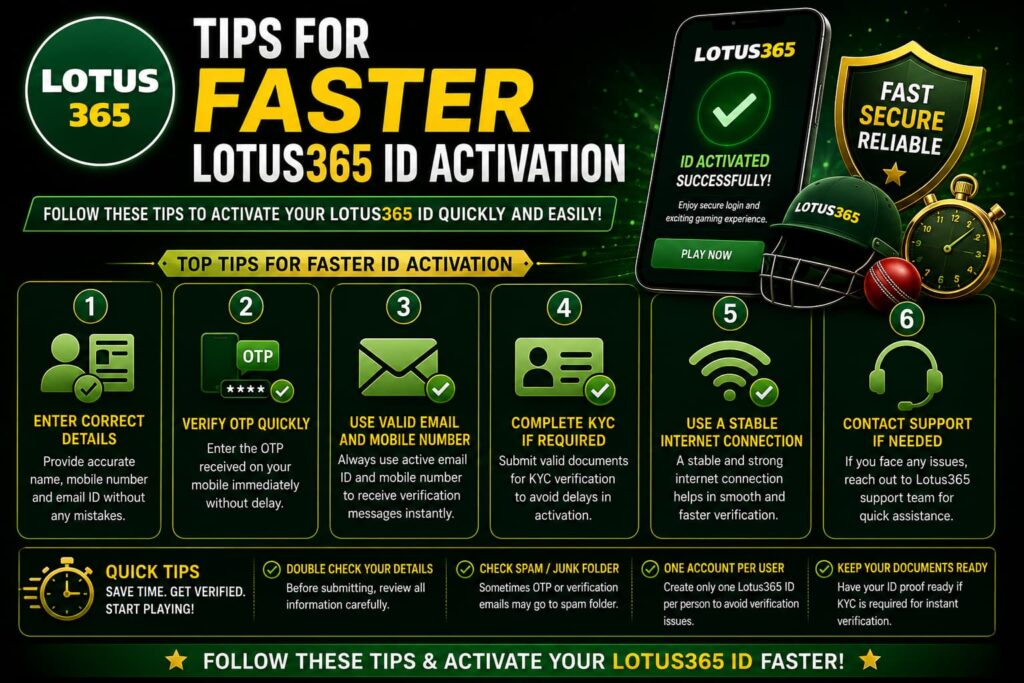
Tips for Faster Lotus365 ID Activation
The probability of obtaining a fully activated Lotus365 ID without needless delay can be greatly increased by following a few simple guidelines. Although system activity and verification requirements may affect activation time, users can take certain types of actions to quicken up the process.
A more effective activation process can be obtained by giving precise information, finishing verification procedures fast, and carefully following registration requirements. A cautious approach during the signup process might assist minimize typical delays and enhance the entire account creation process.
Use Correct Information: Double-check all registration details before submitting the form.
Keep Your Mobile Phone Ready: If a verification code is required, having immediate access to your registered mobile number speeds up the process.
Complete Verification Promptly: Respond to any verification requests as soon as possible.
Avoid Duplicate Registrations: Creating multiple accounts with the same details rarely helps and may delay activation.
Use a Stable Internet Connection: A reliable connection prevents interruptions during registration and verification.
Follow Official Instructions: Carefully read every instruction provided during registration to avoid unnecessary errors.
Users can typically finish verification faster and activate their Lotus365 ID faster following these recommended practices. A successful activation process also contributes to a more seamless Lotus365 login experience.
How to Check Your Lotus365 Login Status
You can identify whether the verification procedure has been finished or if more steps are required if your account hasn’t been activated yet by looking at your Lotus365 Login status.
After completing Lotus365 Signup, you can find any pending verification procedures and avoid unnecessary repeated registration steps by maintaining your account status. By attempting to access their account and examining any relevant account notifications, users may often verify the status of their activation.
You can check your account by:
- Attempting to log in using your registered credentials
- Looking for activation confirmation messages
- Reviewing verification notifications
- Contacting customer support if activation takes longer than expected
After the verification process is properly finished, most users receive confirmation. A more seamless account activation process can be ensured by regularly monitoring your Lotus365 Login status and finishing any necessary verification steps.
Security Benefits of a Verified Lotus365 Account
Besides just activating an account, a verified Lotus365 account has several kinds of long-term benefits. Verification enhances security, establishes a more dependable basis for handling account data, and assists in confirming the identity of the account.
Ensuring that registered details are correct and linked to the right person is made easier with a fully confirmed Lotus365 ID. This lowers the possibility of unwanted access or account-related problems while making future account management simpler.
When it allows safer access during Lotus365 Login and helps keep better control over account activity, completing verification is a necessary step.
Benefits include:
- Better protection against unauthorized access
- Improved login security
- Easier password recovery
- Reliable identity verification
- Safer account management
- Enhanced user confidence
Overall account security is further enhanced by keeping your login credentials secure and updating your account information. Users can have a more secure and dependable Lotus365 Login experience by completing verification and following the best security standards.
Conclusion
Users can register more confidently if they are aware of the Lotus365 ID activation time verification procedure. Following the proper verification procedures will avoid delays and enhance your overall experience, regardless of whether you are using Lotus365 Signup for the first time or waiting to complete your first Lotus365 Login.
The best strategies to ensure a seamless activation procedure are to provide proper registration details, finish verification quickly, and follow the platform’s guidelines. In addition to providing faster access, a verified Lotus365 account enhances account security, makes future account recovery easier, and gives a more dependable login experience. By following the guidance in this article, users can activate their account efficiently and enjoy a secure, hassle-free experience.
Frequently Asked Questions
How long does Lotus365 ID activation usually take?
A Lotus365 ID is often activated within a few minutes after successful verification. However, processing time may vary depending on system traffic and verification requirements.
Is Lotus365 Signup verification mandatory?
Yes. The Lotus365 Signup process may require users to verify their mobile number, email address, or other registration details before the account is activated.
Why is my Lotus365 Login not working after registration?
If your Lotus365 Login is unavailable, your account may still be under verification, or additional security checks may be in progress.
Can incorrect registration details delay activation?
Yes. Incorrect names, phone numbers, usernames, or incomplete information may delay the verification process.
What should I do if I don’t receive a verification code?
Wait a few minutes, check your network connection, verify that your registered mobile number is correct, and request another verification code if the option is available.
Can I create another account while waiting for activation?
It is recommended to wait until your current Lotus365 ID verification has been completed. Multiple registration attempts may increase processing time.